


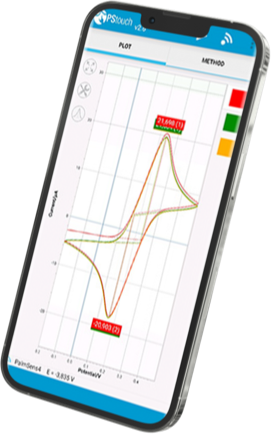

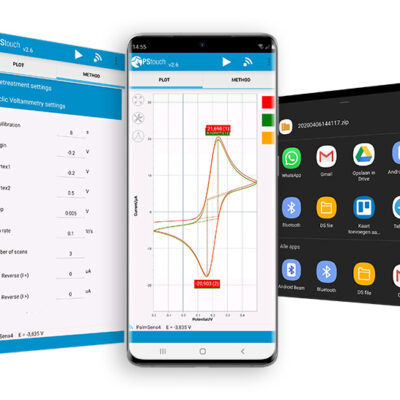
PStouch contains the following features
- Setting up and running measurements
- Loading and saving measured curves
- Analysing and manipulating peaks
- Sharing data directly via e-mail, Dropbox, or any other file sharing service
- Support for PalmSens accessories such as a multiplexer, stirrer or bipot
All method and curve files are fully compatible with our PSTrace software for Windows. The power provided by the USB is sufficient to operate an EmStat or Sensit Smart. This way it is possible to carry an electrochemical work place with you that weights 300 g (Samsung Galaxy S9 with Sensit Smart).
The following techniques are supported by PStouch
Voltammetric techniques:
- Linear sweep voltammetry (LSV)
- Differential pulse voltammetry (DPV)
- Square wave voltammetry (SWV)
- Normal pulse voltammetry (NPV)
- AC voltammetry (ACV)
- Cyclic voltammetry (CV)
- Chronopotentiometric stripping (SCP/PSA)
Technique as a function of time:
- Chronoamperometry (CA)
- Pulsed amperometric detection (PAD)
- Multiple pulse amperometry (MPAD)
- Fast amperometry (FAM)
- Potentiometry (POT)
- Open circuit porentiometry (OCP)
- Multistep amperometry (MA)
- Multistep potentiometry (MP)
Impedance spectroscopy / EIS
- Potential scan
- Time scan
- Scans can be made at a fixed frequency or with a frequency scan.
- Fixed potential
Sharing measurement results
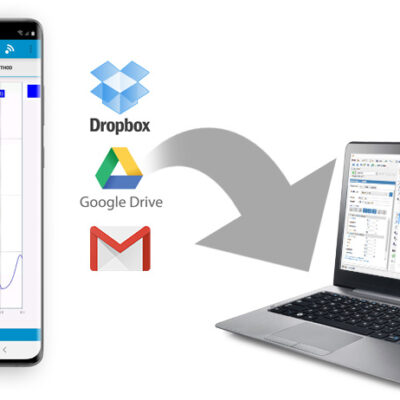
Perform measurements in the field and share data immediately with colleagues in the lab. Data can be stored locally, of course, but PStouch offers share functions to send your data with your email applications to any place you need it. Also the dropbox app, google drive or any other app supporting sharing functionalities is supported by PStouch. So directly after your measurement, your data is safe and backed up before you are back in the lab.
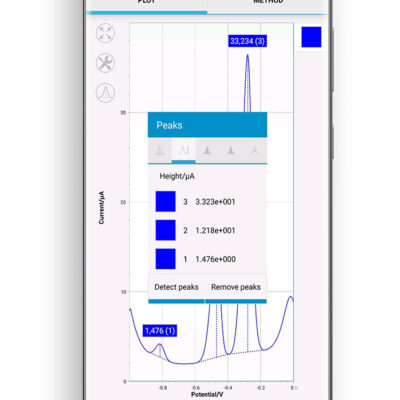
Data processing
PStouch offers you the basic tools to analyse your data. You can look at single points or have automatic peak detection. Detected peaks are analysed for their potential, peak current, peak height, width and area. A survey of the parameters for all peaks is available with one touch.
PStouch saves the data in same format as our windows software PSTrace does. Accordingly all data recorded with PStouch can be further processed with all the functions of PSTrace. So even more advanced analysis will be handled with ease. Take a measurement, share it, your colleagues import it to PSTrace and send the results back to you.
Download
Get in on Google Play Get the latest version on MyPalmSens
Compatible Android Devices
PSTouch is compatible with devices running Android 5.1 or higher. In some cases, the Google Play Store may incorrectly report a compatible device as unsupported. If this occurs, you can safely download PSTouch directly from MyPalmSens, our official distribution platform.
To control PalmSens potentiostats via USB, the Android device must support USB OTG (On‑The‑Go). This feature allows the device to act as a USB host and communicate with external hardware. Not all older smartphones or tablets include USB OTG support, so we recommend checking your device specifications if you plan to use a USB connection
Compatible PalmSens Instruments
Model / Version | Bluetooth | USB |
|---|---|---|
EmStat3 and EmStat3+ | ||
EmStat3 Blue and EmStat3+ Blue | ||
EmStat4S | ||
EmStat4X, EmStat4R and EmStat4T | ||
EmStat4M | ||
PalmSens1 and PalmSens2* | ||
PalmSens3* | ||
PalmSens4 | ||
Sensit Smart | ||
Sensit BT and Sensit Wearable | ||
EmStat Pico Development Kit | ||
Nexus | ||
*Requires additional Bluetooth extension for Bluetooth connection |